Sunday, June 14, 2015

Should I Use Pinterest?


Do you often feel that you are disconnected in Social Media like this electrical box? The platforms make changes quickly, don't tell us about the changes, and we scramble to keep up.  That is why I decided to specialize in Pinterest only. .  As they make changes to the platform (has been very often lately) I can study and stay abreast of these changes. 

Pinterest is becoming a better tool for business owners almost daily and getting the attention of many people. In addition,  Pinterest is getting more attention from the mainstream social media folks.  As you read the recent articles about Pinterest, you may have thought - Is Pinterest for me?  Ask yourself, " Do I want to be in front of a community that has these traits?"
  •  The fastest-growing and most powerful group in the marketplace
  •  Retail outsells Amazon, Yahoo, Bing and Google in final dollar sale  
  • The average order of $194 doubles Facebook orders
  • 20M people in this community have a household income of over $100,000
 If so, then Pinterest is for you.  Pinterest is an excellent tool for any business that has a product that is visually appealing.  If you are a service industry that can pin news, trends, and inspiration,  Pinterest is also a good tool for you.  


In addition, take a look at this short video I created and make a decision - Should I use Pinterest?  Let me know what your answer by commenting below. 


Monday, May 11, 2015

How to Use Your Mobile Device to Post to Facebook Business Page from Pinterest

I had a question about posting to Pinterest to your Facebook business page using a mobile device.  I thought other people might have the same question.  

The short answer is – yes.  The  long answer with how to do it is below.

When you click on the Pinterest icon, you will get the "news feed" showing the pins of other pinners.  If you would like to pin one of these on your Facebook Business page, then click on that pin. 

The Facebook icon will appear at the top.  Click on the Facebook icon.  Underneath the pin name you will notice in small letters the words "Tap to Change.”  

Click on these words and you will see the options to pin to your business page, group page, etc. 


Good luck and happy pinning!!!

Wednesday, April 29, 2015

Urgent News About Sharing Pins to Facebook

Pin to Facebook business page

If you tried pinning to your Facebook Business page, you may have become confused. Some of you may remember in my March 30 newsletter I told you about pinning to your Facebook Business Page.  (Illustrated in image to the left) You still can.  However, I have noticed a couple of points that I need to emphasize.

As I was working on a Pinterest account, I clicked on the Pinit button to pin an image to the Facebook business page, I noticed I did not have the drop down menu to chose the Facebook business page.


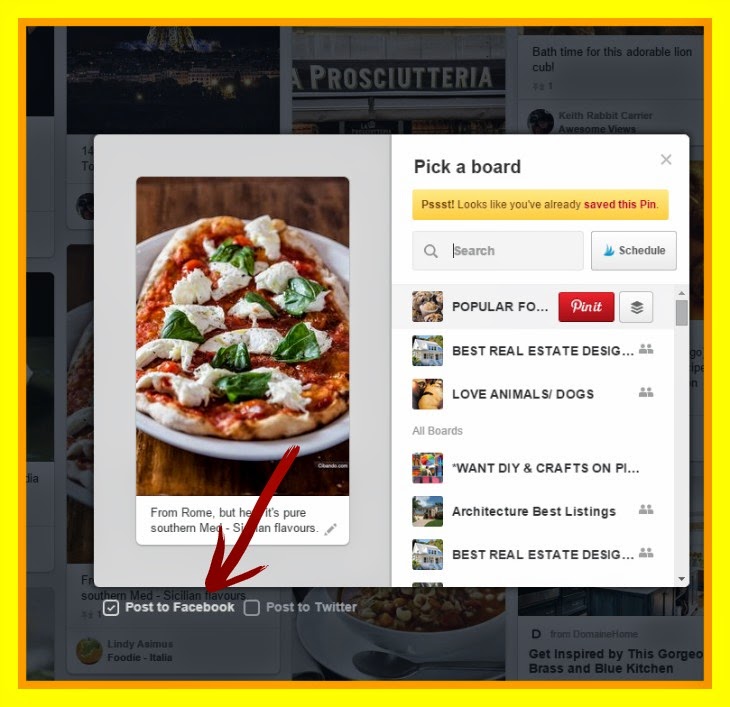
I cussed Pinterest a little for changing things again and then began to research to see if the option was still there somewhere.  I traced my steps to figure out what I had done differently.  Ah-ha!!! I was browsing on my Food and Drinks board and decided to  pin one of the images to my Facebook Business Page.  I clicked  on the Pinit button at that point,  as illustrated in the image to the right,  When I clicked the Pinit button I got the following image. (See Below)  Hmmm.


Notice the 2 small boxes at the bottom of the image where the red arrow is pointing.  The two boxes are  Post to Facebook and Post to Twitter. There is not a drop down menu with the choice to pin it to my Facebook Business Page. I decided to test it, clicked on the box here (puts a check mark in the box), and the image posted to my personal account.  Oops, not what I wanted to do.  I thought, "I know I could do that before.  Was I dreaming?"


I clicked on the pin to make it the larger single image that you see in the image below.  After doing this, I  saw the Share to Facebook button at the top (where the green arrow is pointing).  Ok, this is where I posted to my Facebook Business Page.


 I clicked on the Share to Facebook button and got the drop down menu where I could choose my business page to post the pin. (illustrated in the first image).


When you are browsing pins in your feed or on another person's Pinterest account and share to Facebook at that point, the image will be posted on your Facebook personal page.  When browsing, I pin the image to one of your boards and then share to Facebook from your board. This will give you more traffic to your board and enable you to Pinit to your Facebook business page.

In case you missed the original blog, here is the link for that blog:  http://pinterestingtips.blogspot.com/2015/03/want-to-pin-items-to-your-facebook.html.

STAY PINTERESTING!!

Monday, April 27, 2015

The Secret to an Audience of 20 million That Earns $100,000 and More

Do you often sit in front of your computer and wonder which median you should use to promote your business?  You open your email and you are bombarded with emails that tell you use Instagram, use Facebook, use Twitter, let me help you with SEO.  Who has time to figure this all out.  You get overwhelmed and delete all of them and look like this --------------------------------->

What if you knew you could choose a marketing platform that would put you in from of an audience that earns $100,000 or more, is the fastest-growing and most powerful group in the marketplace, and retail outsells Amazon, Yahoo, Bing and Google in final dollar sales?

Those are the statistics for Pinterest.  28.1% of the Pinterest audience earns $100,000 or more. (Represented by the blue shaded area to the left)  You remember someone talking about Pinterest at one of those many network meetings you sat through but kept thinking it is a bunch of females. (That is what the last solicitor told you) However, the solicitor failed to tell you that females do 65% of the consumer spending and men now make up 20% of the Pinterest audience.

Hmmm.  may have a point there.  Maybe I could learn Pinterest and get in before these other folks figure out how effective it is.  If you do decide to give Pinterest a try - remember - Pinterest is the turtle; other social media are the rabbits and be patient.  The average lifespan of a Facebook post is 90 minutes.  The lifespan of a pin is illustrated in this diagram.

If you need help, go to my website http://www.pinterestpro.com.  My website was purposely designed to offer a large amount of information to help individuals.  
 Have a Pinteresting Day!

Sunday, April 19, 2015

5 Easy Steps to Creating a Pinterest Profile


You created a Pinterest Business account.  Now you need to build your profile.  How do I do it?
You look at others and try to figure it out.  Here are seven easy steps to a great Pinterest Profile that will help you to get found.


Getting Started: 
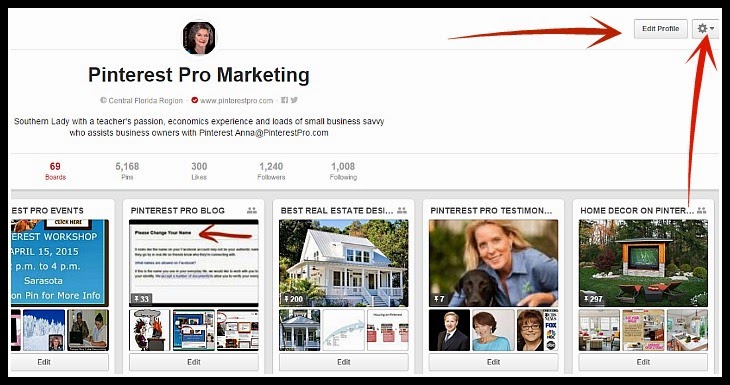
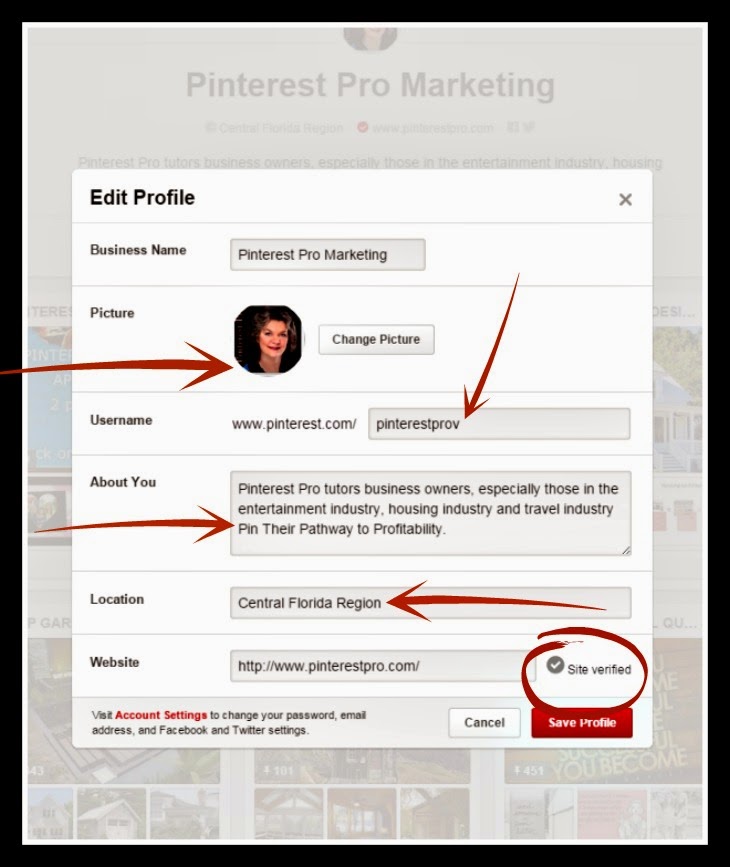
 On your Pinterest home page, look in the upper right part of the page. See where the red arrows are pointing to in the diagram below?  You will see Edit Profile and then a little "gear" button next to it. When you click on the Edit Profile button a page resembling the one below will appear. Pay attention to the red arrows.  


Step 1-    

  • Profile picture:   Have a professional profile picture of you. People want to see the person behind the company. 
Step 2- 
  • Username:  Change this to be more uniform with your other social media.  For example, I use Pinterest Pro as much as possible.  As you can see in the image to the left, I use  Pinterestprov becuase another pinner had Pinterest Pro. (13 characters)
Step 3-
  • About You: Use this space to let pinners know what your business is.  You can use 160 characters and spaces.  Be concise, use key words, and describe what you do. 
Step 4-
  • Location: Either put your exact location or a more general location.  As you can see in the image to the left, I put Central Florida to cover a broader base.  
Step 5- 
  • Website: Put your website URL and have website verified.  Pinterest provides the HTML code for this.  If someone else built your website, they will need to do this for you.  
You now have a good Pinterest Profile.  Click on save.  When your website is verified, you will notice a red check mark in your profile box by your web address . You can see mine where the red arrow is pointing in the image to the right.  Website verification lets Pinterest know you are a legit business and not a fake company. After the website is verified, you will get analytics and move up in the search on Pinterest.

Have questions?  Please email me at anna@pinterestpro.com or leave comments below. 

Next week - what about all this other "stuff"?


Friday, April 17, 2015

FACEBOOK IS THE GOVERNMENT


I get the message in the image to the left from Facebook to change my name because it doesn't appear authenticate.  Facebook is worried that people that know me will not be able to find me.  Isn't that nice of them? I could quote all reasons this is not logical but I will not.  I am locked out until I provide one of the items listed in this image. Haven't we been lectured about identity theft and being careful about such documents?  But I am supposed to trust a company that never answers emails must less let you talk to a live person.
Of course I do not need to worry because Facebook gave me this reassurance. I can totally trust them to do just that.  Right?  I trust it as much as I would trust such a statement from a government agency. Not!!!


Sunday, April 12, 2015

The Beginner's Guide to Creating a Pinterest Business Account


For a better view of infographic, Click here
Infographic on Anna's Board'
Have you looked at infographics similar to the one to the right and thought, "Maybe I should check out this social media, Pinterest?"  You go to the website and begin to establish a Pinterest account.  Then all the decisions have to be made. Business account or Personal account?  Interests? Create a board?  Photographs, where did all these images come from? You get that panicky feeling you used to get in Ms Wright's room in elementary school.  You get very frustrated and feel like throwing your hands up.


The image to the left may be a perfect depiction of how you feel.
That bottle of wine begins to call your name.


Don't panic - Pinterest Pro is here.  I created a video, "How to Create a Pinterest Business Account."  The video is on my website.  To view the video click on the URL provided here,  http://www.pinterestpro.com/services/pinterest-business-page-setup/. The video has screen shots for you to follow.  With the video, you can stop and start it, rewind, and fast forward.

Go follow the tutorial.   If you have questions, please email me, anna@pinterestpro.com, or you can call for a free 30 minute consultation, 407-421-3541.  I can see the thought bubble above your head now.
 Oh, she is trying to sell me something.  No, I'm  not.  I have a teacher's passion for helping people learn and understand how to do something.

I would appreciate you letting me know if it was helpful or send suggestions for changes.

Next week,  What do I name my boards?  I have an answer for you. 

Stay Pinteresting!


Monday, March 30, 2015

Want to Pin Items to Your Facebook Business Page? 

I love Pinterest as a social media.  It has all the other social medias beat when it comes to viral content and shelf life.  My one complaint was that you could not share pins to Facebook because Facebook did not want Pinterest playing in their sandbox.

Well - TA-DA - You can now pin to your FACEBOOK BUSINESS PAGE.  Yes, I said business page not your personal page.  In the diagram to the left I circled in read the drop down menu that allows a pinner to do this.  Just to be sure you understand how to do this I am providing the following steps:


  • Click on the board to enlarge the board
  • Click on the pin you want to share on your Facebook page
  • Click on the Share button in the upper right corner
  • After you click on the Share button, you will see On Your Timeline in the upper left corner
  • Click on the arrow in the right corner and a drop down menu will appear
  • The drop down menu will offer you these options
    • On your own Timeline
    • On a friend's Timeline
    • In a group
    • On a page you manage 
    • Send in a private message
Try it out and see what you think.  As I keep saying, "Pinterest keeps getting better and better."  Please feel free to contact me if you need any help with this.  STAY PINTERESTING!!!

Friday, February 6, 2015

How Do You Create Promoted Pins?


After you get approved for promoted pins, you can go to the site.  I have a screenshot to the left.  You can see that Pinterest suggests pins for you to promote.  If you do not see the one you want to promote, you can search for the pin with the search box to the right.  


Step 2 is creating your promotion.  I have a screen shot of the options to the right.  This is
especially useful for businesses that are local businesses.  You narrow the audience to your location.  Other choices include gender, language, and types of devices.  You are instructed to select keywords.  As you can see in the quote below, you need to select at least 15 keywords.  The quote below is from an email I received after getting my first promoted pin approved. I was experimenting so I would know how they worked.  
The thing I like about Pinterest is they give you feedback and suggestions about how to improve your pins in order for them to be approved and get more responses.  

"It looks like you're only spending $0.00 out of your $20.00 daily budget. To make the most out of your Pinterest tips campaign budget, try these tips:

Fine-tune your terms: Make sure you’ve got at least 15 terms for each Promoted Pin so your ad gets in front of the right people.
Add more Pins to your campaign: By increasing the number of Pins you have, you can see which types of Pins are resonating with your audience.
Increase your bid: Bump up your max bid to win more auctions against others who are targeting the same terms."

Tuesday, January 27, 2015

How to Schedule 25 Pins Per Day

Often clients ask me what I use to schedule pins.  After much trial and error (more error than trial) I settled on Viraltag.  There platform has improved so much over the years.
To the right is a screenshot of the updated version they just rolled out.
You will notice across the top there are headings.  The failed posts and recent posts are new.  I like those features because you can see what did not post and why. Also you can look at the recent posts and to be certain you did not pin an image you are about to pin.
Next you see across the top several different social media icons.  On Viraltag, a user can now post to 10 different accounts.  The social media Platforms included are Facebook, Pinterest, Twitter, LinkedIn, and tumbler in any combination.  For example, you can schedule posts for your Facebook personal page, Facebook business page,  Pinterest account, client's Pinterest account, .........all at the same time.

If you have used Viraltag, you are familiar with the Discover feature.  This feature discovers images on topics.  This now has a search feature and are not limited to the topics they list.

This is a screenshot of my account with images scheduled to post to different platforms.  A great feature for those that manage Pinterest accounts for companies.  Also makes it easy to write a keyword rich description and add the URL all in one place.

Give it try and let me know what you think. 

Wednesday, December 17, 2014

LOOK! PINTEREST HAS 2 NEW CHANGES TODAY!


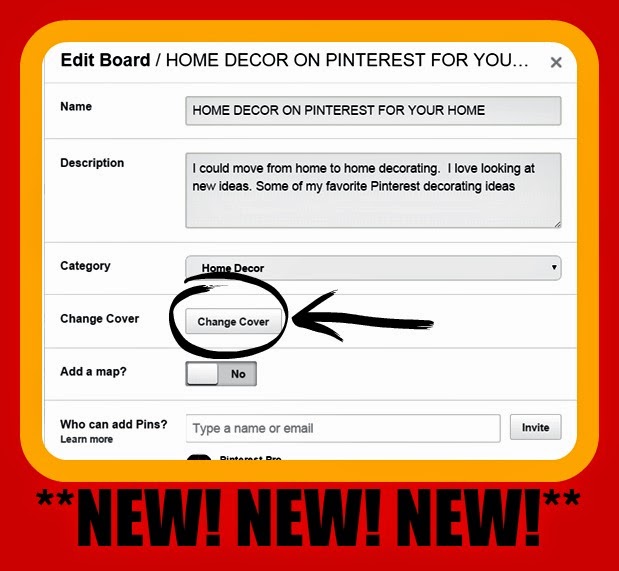
Pinterest just keeps getting better and better.  After being very frustrated with trying to change the covers on my boards. I decided to do a little exploring.  I clicked on the board edit button.  Wow! A new button there.  As you can see in the picture above, there is now a change cover button.  When you click on that button, you are able to scroll through the board pins and choose a cover.  (this works just like it did before when you just put your cursor over the pin on the cover.)   AMAZING!!!! 
Another change is you can now move pins easier.  When you click on the board name, you will not only see all the pins on the board but you will also see the addition of a button named MOVE PINS.  Follow these steps: 
  1. Click on the move pins button you will see 3 buttons at the top of the top: (move, copy, and delete.as illustrated above)   
  2. Choose the pins you wish to move, copy or delete by clicking on the pins (you will see a red check mark on the pins you select)
  3. Click on Move, copy or delete
    1. If you click on Move or copy, you will then be instructed to choose the board you wish to move or copy the pin 
    2. If you select, move the pin will be moved to that board and no longer be on the original board
    3. If you select, copy the pin will remain on the original board and be copied to the board you selected.  
Wow!  Hope this helped.  Stay tuned for more updates about the ever evolving Pinterest platform. 


Monday, December 8, 2014

What does Laquon Treadwell have to do with Social Media?


Do you know who Laquon Treadwell is?  He is  Ole Miss receiver that was  close to scoring a go-ahead touchdown with 1:30 remaining in the Auburn game when he was tackled from behind and fumbled. His left leg and ankle bent at an awkward angle and the 6-foot-2, 229-pound sophomore was in obvious pain before being carted off the field.

Replay showed he fumbled the ball due to the excruciating pain just before the end zone, giving Auburn the ball and the win. In a few short seconds everything changed for him and his team.  

Let's see what we can learn from this young man's statement the day after the injury. 
  • Laquon was injured doing what he loved - playing football
    • Social media managers are doing what they love and run into obstacles i.e. client wants more followers, potential client decides to not hire us, a contest does not work
Laquon's statements: 
  • “Not everything in life is set out to be easy, & not every plan we have for ourselves work out in our favor."
    • When things go wrong, we can say not everything in life is set out to be easy, and not every plan we have for our clients works out
  • “Even the greatest & most powerful people we praise or look up to have huge downfalls”
    •  If we look around, we will see that even the influencers in our field have downfalls 
  •  “It takes a strong person & an even stronger mindset to prepare for that major come back. It didn't kill me, so watch as I become stronger. Thanks for the prayers everyone, God bless..” 
    • When we run into obstacles, we can  tell ourselves that we are strong and we will bounce back and do it better the second time around. 

Don’t let the bumps in the road get you down.  Have Laquon’s attitude and prepare for a major come back. 

Monday, November 24, 2014

I have an answer for you - JUST DO IT!!


As I was reading the Hubspot Blog "The Science of Productivity," I was reminded of this video by Kolowich's statement, "Before we embark on big projects, our brains attempt to simulate real, productive work by focusing on small, mindless tasks to pass the time -- and, consequently, prevent us from getting anything done." 

How many times have you done this?  I know I have.  I will sit down at the computer to write a proposal for a client, write a blog or schedule pins.  The next thing I know  I am reading emails or sorting items on my desk.  I need to JUST DO IT!

I believe that is why many business owners are not successful with Pinterest.  At the beginning, a person has to gather pictures, do research, look for clients; and there is no instant gratification.  I say to you in the words of Art Williams and Nike "JUST DO IT!" You will be glad you did. 

Monday, October 27, 2014

WHAT PINTEREST PRO CAN TEACH US ABOUT STATS

You see this graph and your immediate reaction is but I thought......Pinterest Pro said.....Did she lie to us?.........The graph clearly shows Facebook is a clear winner when it comes to the social media traffic referrals.  No doubt about it.  Also you can see that Pinterest flatlined in June/July.  The question is what caused that?  What changes were taking place in Pinterest?  What changes were taking place in Facebook?  As an economists I know that you have to look at underlying conditions also.  Do your research.  Stats can be misleading.  
 The good news is that Pinterest is hanging in there.  Look at the table above.  The other social medias are not hanging in there. Twitter saw a drastic decline. The only other social media worth mentioning is Google+ because it did have a significance increase.
Now look at this graph.  This shows Orders received after the traffic was driven to the website.  You can see that Pinterest outsells Google and Amazon.  Pinterest also doubles Facebook sales. The Pinterest dollar amount has increased in recent months.  As the saying goes, "People go to Pinterest to see what they want to buy."  Don't let fear hold you back from learning about this social media.  

Monday, September 22, 2014

Your Day Is About to Get Better


Our Deepest Fear is not that we are inadequate....but that we are powerful beyond measure.  


Fear is what holds us back.  Holds us back from taking that first step towards being powerful beyond measure and successful.  Fear is that tight feeling we get in our chest when we think of trying something new. 

 Sometimes when I am talking to business people about using Pinterest I can see that fear - fear of trying something new to market their product. 
 Fear that I am not telling the truth......................
Fear that it won't work...........................................
Fear that it will be money wasted..........................
But what if it is a powerful marketing tool and you did not give up?

Pinterest is upgrading daily and amazing things are happening.  Let your own light shine and step out there and take a look.  Your brave step will shine the light for others to use the powerful Pinterest tools that are more viral and have a longer shelf life than any other social media. 

Tuesday, September 16, 2014

Actually the Pinterest Pro website is gone.  A client mentioned  that when she clicked on my link,she got a screen that looked like the top picture to the right.  The problem was Pinterest Pro did not know the difference between your website being developed, the hosting of your website, your domain name? You purchase your domain name (URL), someone develops your website for you (writes it, lays it out and all that fancy stuff), and then someone hosts the website for you.  I thought it was all in one.  
 I realize some of you are thinking, "Everybody knows that.” I did not. Wait a minute it gets more interesting. A couple of years ago,  I was advised by my "coach" to use a person in India to do my website. Therefore, I hired the Indian person to create a website for me. I thought all was fine. What I did not know was that he was hosting the website on his server (do not laugh if I used the wrong term) in India. This person disappeared, He was nowhere to be found. As a result, I no longer have a website. I really did not want to make a quick trip to India.
 I did not know what to do so I contacted, Billy Bob (name changed to protect the unknowing). He explained to me what had happened and gave me advice I wish I had already received - It is OK to have you website developed by someone in India but always have it hosted by a reputable firm here such as GoDaddy, Blue Host, etc. "OHHHHHH." Thank goodness, I had learned a few lessons along the way and had copies of all my files. 

If you tried to use www.pinterestpro.com, you got the picture at the bottom. That is because I am having a new website built and I have purchased the pinterestpro.com URL. New website coming soon!  Lesson learned.  My business world tuition keeps going up. I think I have a doctorate by now.J

Tuesday, August 19, 2014

Top 10 Benefits of Social Media


Ten benefits of social media are presented in this video.  I borrowed the list from Complete Developer's eNewsletter because I have a lot of respect for the company. . The eNewsletter gives more information about each one.
Click Here for Video
 If you would like to read the article go to  www.completedeveloper.com

Many small business owners will look at this and think social media is the end all, cure all.  What the small business owner doesn't realize is how much time it takes to develop that following, resulting in unreal expectations.  As a small business owner please remember the following about social media: 
  • Pin, post, upload, etc. consistently 
  • Cross promotion between the social medias is vital
  • Having an email list to make clients aware  is golden
  • Takes a lot of time and effort to search for your target market 
  • Give the social media time to develop 
  • Think long term
If you remember this points and are diligent, social media can be an awesome asset to your marketing plan. 

Tuesday, August 12, 2014

How Do You Choose Names for Your Pinterest Boards?


One of the Top 3 questions I get asked is "How Do I Choose Names for My Pinterest Boards?"  Peers seem to be more concerned about the name of their boards than the description of their pins.  Below is a short video giving hints for naming your boards.  Shadow, the Pinterest Tipster, sends the message "Enjoy and take notes." 

Thursday, August 7, 2014

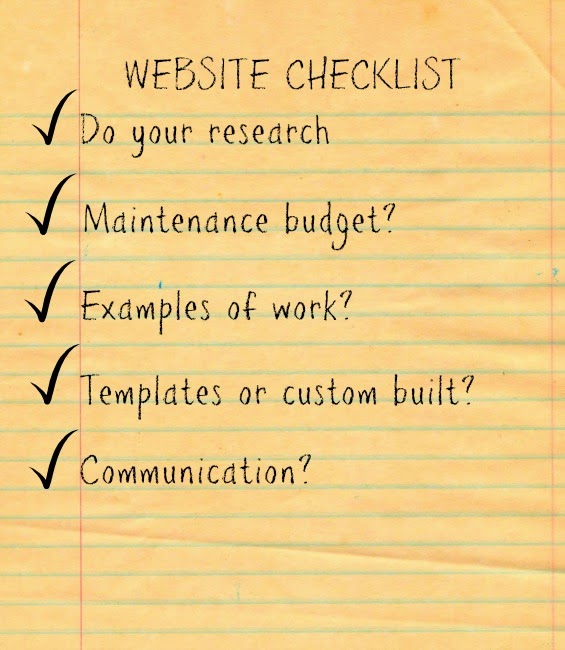
Do you Need a Website?


Think a website is not important.  Think again.  That is where you make the sale. However, don't just throw one up there.  Think carefully about who you hire.  Take a look at these hints before you look.
For more information click here http://blog.completedeveloper.com/doing-it-right-the-first-time-5-ways-building-a-website-is-like-building-a-house-or-office/


Friday, June 27, 2014

Pinterest and SEO


Hear a lot of talk about SEO and wonder how to improve it for your business.  One sure way is with Pinterest.  Watch the video and get some helpful hints about what to do.  How many of these tactics do you use now?
Keep it Pinteresting!!